Article
Decode an Instagram Account in One Picture
Use Decode System with Claude Code to map an Instagram account’s reels, compare hooks and topics, and turn the patterns into three video ideas for your own niche. Includes setup steps and a guide to reading the results.
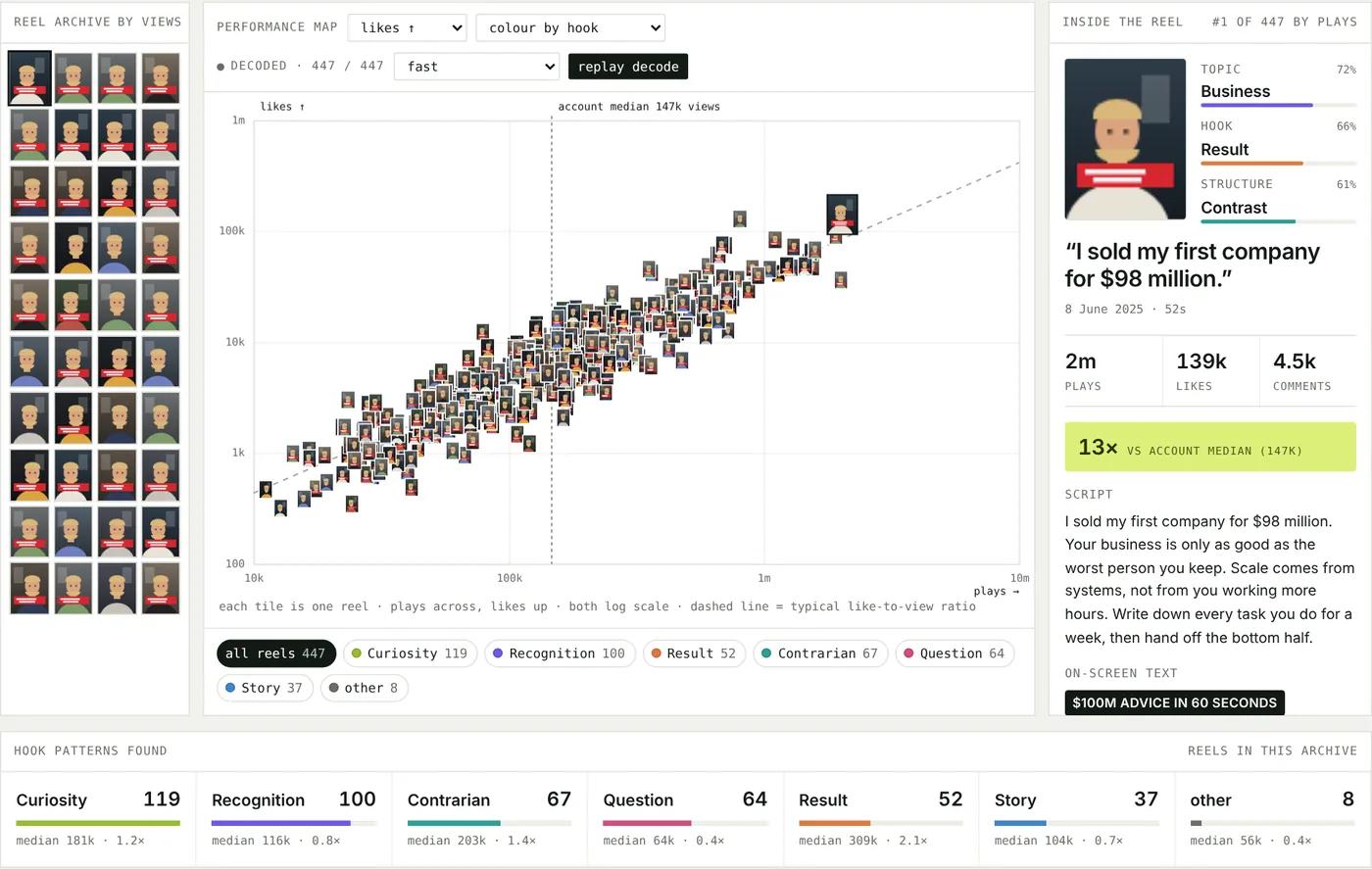
Decode System is my free tool for turning an Instagram account’s reels into a visual map. See which hooks, topics, and structures tend to perform best for that account, then use those patterns to develop three video ideas for your own niche.
The workflow starts in Claude Code: share the project link and type start. It guides you through setup, asks about your niche, and helps you choose an account to analyse. Allow roughly 30 minutes for a run; the time depends on your computer, the account, and the number of reels.
The dashboard image above uses demo data. Each thumbnail represents a reel, with its performance on the map and its hook, labels, and script available alongside it.
What you need
Claude Code — the coding assistant runs the setup and analysis. The guide also supports using Cursor or Codex. You do not need to write the code yourself.
An Apify account — used to retrieve the reels from Instagram. You will need an API token.
A TypeSafe account — used for Jev, which labels each reel by topic, hook, and structure. You will need an API key and account credit. The guide suggests an initial $5 top-up; check the current billing options in your account.
1. Get your two keys
In Apify, open Settings → API & Integrations and copy your token. In TypeSafe, open API Keys, create a key, and copy it. Add credit in Billing if needed.
Treat these keys like passwords. Paste them into the local configuration file when the setup opens it, rather than into the chat.
2. Start Decode in Claude Code
Paste the Decode System repository link into Claude Code and type start. Review the setup commands it proposes and approve the steps needed to install and run the project.
Open Decode System on GitHub to view or download the project. Or copy this into Claude Code to begin:
https://github.com/dayrentjiang/decode-system
start
3. Follow the guided setup
The assistant installs the required tools and opens a small configuration file. Paste your two keys there and save it: Cmd+S on Mac, or Ctrl+S on Windows.
Tell it your niche and the kind of videos you make. It suggests three accounts worth exploring; pick one to decode.
It retrieves up to 300 recent reels, transcribes their speech, and labels each one. Once the analysis is ready, the decode page opens in your browser. The assistant explains the stronger patterns and writes three video ideas for you.
To analyse another account, give it the handle. The workflow reuses reels it has already downloaded.
How to read the page
Performance map
Each reel is a thumbnail. Further right means more plays; higher up means more likes. The vertical line marks the account’s median plays: half the reels are above that number and half below it. The diagonal line shows the typical like-to-view relationship.
Inside the reel
Click a thumbnail to inspect its opening hook, topic and structure labels, performance numbers, and full script. Use this to understand how a strong opening works and adapt the approach to your own subject.
Patterns found
Compare how many reels use each hook type and how those groups perform. A 2.1× label means that group’s typical reel has 2.1 times the account’s median plays. It describes that account’s results, rather than predicting what your next video will get.
Which patterns win?
The rankings compare topic, hook, structure, and length. Give less weight to anything marked “too few to call”: a small group of reels is a weak basis for a pattern.
Pick an account you can learn from
Choose someone one or two levels ahead of you, whose production style you could realistically try. An account that posts reels regularly—around 50 or more over recent months—gives you more examples to compare.
Look for steady results across several videos, not just one viral hit. A very famous creator may attract views for reasons that do not transfer to your account. It also helps to choose someone working in the format you want to make, such as talking-head videos, skits, or tutorials.
What it costs
The project README estimates roughly US$1 in service usage for 300 reels, mostly for Apify, with about 1–2¢ for Jev labelling. Whisper runs on your computer, so there is no transcription API fee. These are estimates, not fixed prices. Your coding-assistant plan or usage is separate, and actual costs depend on the services and workload.
Apify’s pricing page currently lists $5 in monthly usage credit on its free plan. Check your Apify and TypeSafe billing pages before a run; account top-ups and per-run usage are different costs.
Good to know
Do I need to know how to code?
The assistant handles the commands. Your part is setting up the service accounts, adding keys to the local file, choosing an Instagram account, and reviewing the results.
Where do my keys go?
The intended setup stores them in a local .env file and uses them to authenticate requests to Apify and TypeSafe. Keep that file out of shared folders and version control, and do not include keys in chat messages or screenshots.
Does it work on Windows?
The guide supports Mac, Windows, and Linux. Its Windows workflow does not read text overlaid on the video, but still uses the spoken words and caption.
Why skip the newest reels?
The workflow excludes reels published within the last three days so they have some time to collect views before being compared with older posts.
What is Jev?
Jev is the TypeSafe model used to classify each reel’s text. It selects a topic, hook type, and structure from a defined set, with confidence scores. Treat those labels as a starting point to review.
What if something goes wrong?
Tell Claude Code what happened and share the error message with any keys removed. Common things to check are a private Instagram account, a mistyped handle, an incorrect API key, or insufficient TypeSafe credit.